

Quick Reference for AI Agents & DevelopersThis guide covers integrating AI-powered chat capabilities in React Native:
- Setting up AI Assistant chat screens with
CometChatMessageList,CometChatMessageComposer, andCometChatMessageHeader - Configuring navigation for AI chat flows
- Customizing AI chat themes and styling
- Managing AI chat history with
CometChatAIAssistantChatHistory
- AI Assistant Chat History - Display previous AI conversations
- Message List - Core message display component
- Message Composer - Input interface for messages
- Message Header - Header with user info and controls
- AI Assistant Chat History
- Chat History Management
- Contextual Responses
- Agent Detection
- Seamless Handoffs
Overview
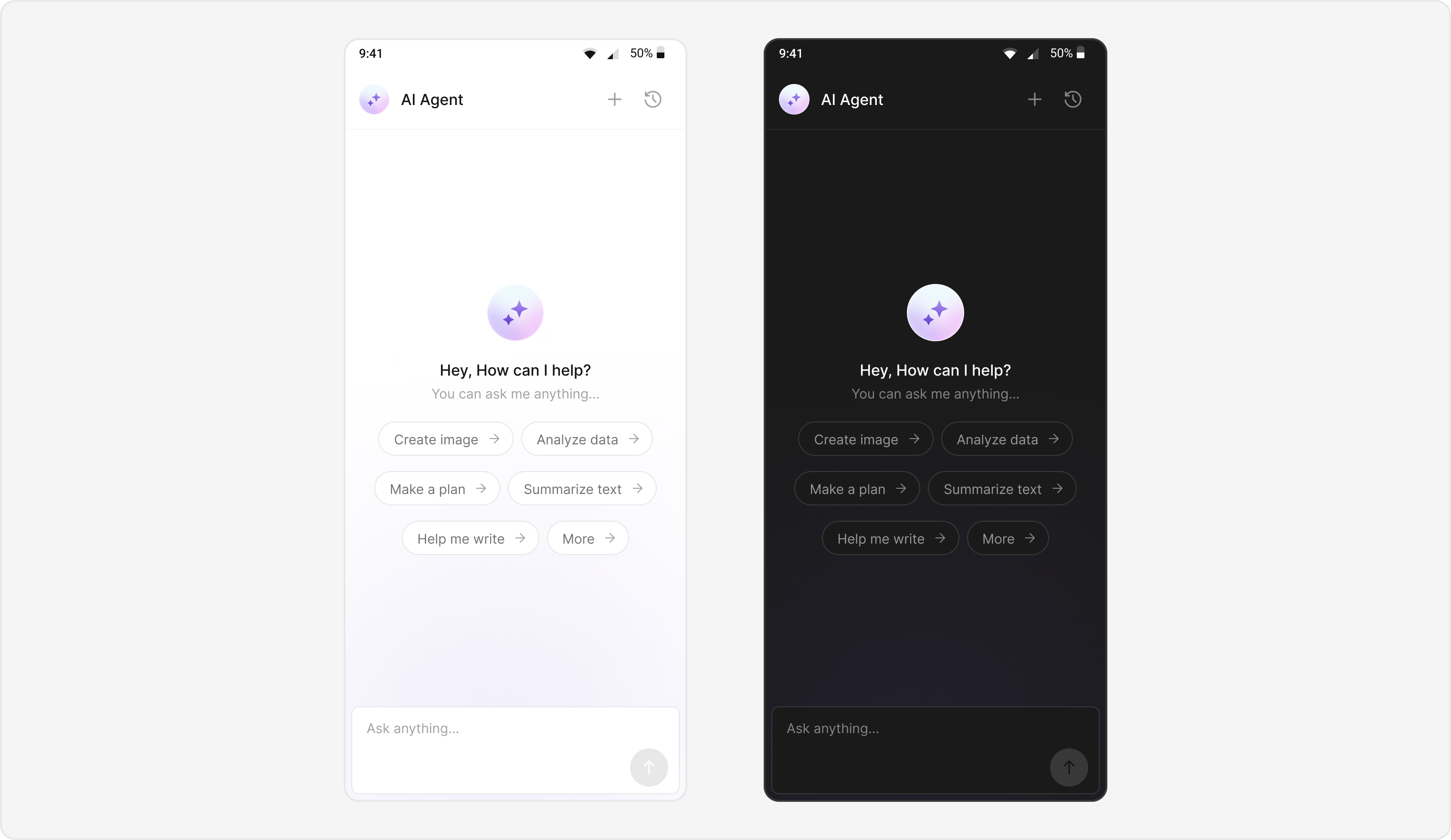
Users can interact with AI agents through a dedicated chat interface that:- Provides intelligent responses based on conversation context.
- Maintains chat history for continuity.
- Seamlessly integrates with your existing user chat system.
Prerequisites
- React Native project with @cometchat/chat-uikit-react-native and @cometchat/chat-sdk-react-native installed.
- Valid CometChat App ID, Region, and Auth Key configured via
CometChatUIKit.init(). - User logged in with
CometChatUIKit.login(). - AI Agent configured in your CometChat dashboard.
Components
| Component / Class | Role |
|---|---|
AIAssistantChatScreen | Main screen for AI agent chat. |
CometChatAIAssistantChatHistory | Displays previous AI conversation history. |
CometChatMessageList | Shows AI messages with threading support. |
CometChatMessageComposer | Input interface for AI conversations. |
CometChatMessageHeader | Header with AI agent info and controls. |
Integration Steps
Step 1 - Screen Setup
Create the AI Assistant chat screen with proper navigation and component configuration.- TypeScript
- JavaScript
Report incorrect code
Copy
Ask AI
import React, { useState, useEffect } from 'react';
import { SafeAreaView, View, Text } from 'react-native';
import {
  CometChatMessageHeader,
  CometChatMessageList,
  CometChatMessageComposer,
  CometChatThemeProvider,
} from '@cometchat/chat-uikit-react-native';
import { CometChat } from '@cometchat/chat-sdk-react-native';

interface AIAssistantChatScreenProps {
  route: {
    params: {
      user: CometChat.User;
      parentMessage?: CometChat.BaseMessage;
    };
  };
  navigation: any;
}

const AIAssistantChatScreen: React.FC<AIAssistantChatScreenProps> = ({
  route,
  navigation,
}) => {
  const { user, parentMessage } = route.params;
  const [currentUser, setCurrentUser] = useState<CometChat.User>(user);

  useEffect(() => {
    initializeComponents();
  }, []);

  const initializeComponents = () => {
    // Set up AI-specific configurations
    console.log('Initializing AI Assistant Chat for user:', currentUser.getName());
  };

  const handleNewChatClick = () => {
    // Navigate to new AI chat
    navigation.replace('AIAssistantChat', { user: currentUser });
  };

  const handleChatHistoryClick = () => {
    // Navigate to chat history
    navigation.navigate('AIAssistantChatHistory', { user: currentUser });
  };

  return (
    <SafeAreaView style={{ flex: 1 }}>
      <CometChatThemeProvider
        theme={{
          light: {
            messageListStyles: {
              containerStyle: {
                backgroundColor: '#F8F9FA',
              },
              outgoingMessageBubbleStyles: {
                containerStyle: {
                  backgroundColor: '#E3F2FD',
                },
              },
            },
            messageComposerStyles: {
              containerStyle: {
                backgroundColor: '#FFFFFF',
              },
            },
          },
        }}
      >
        <CometChatMessageHeader
          user={currentUser}
          onNewChatButtonClick={handleNewChatClick}
          onChatHistoryButtonClick={handleChatHistoryClick}
        />

        <CometChatMessageList
          user={currentUser}
          parentMessageId={parentMessage?.getId()}
          // AI-specific configurations
          emptyChatGreetingView={<AIGreetingView />}
          streamingSpeed={50}
          aiAssistantSuggestedMessages={[
            'How can I help you today?',
            'What would you like to know?',
            'Ask me anything!',
          ]}
        />

        <CometChatMessageComposer
          user={currentUser}
          parentMessageId={parentMessage?.getId()}
        />
      </CometChatThemeProvider>
    </SafeAreaView>
  );
};

// Custom AI Greeting Component
const AIGreetingView = () => (
  <View style={{
    flex: 1,
    justifyContent: 'center',
    alignItems: 'center',
    padding: 20
  }}>
    <Text style={{
      fontSize: 18,
      fontWeight: 'bold',
      marginBottom: 10
    }}>
      Welcome to AI Assistant
    </Text>
    <Text style={{
      fontSize: 14,
      textAlign: 'center',
      color: '#666'
    }}>
      I'm here to help! Ask me anything or choose from the suggested prompts below.
    </Text>
  </View>
);

export default AIAssistantChatScreen;
Report incorrect code
Copy
Ask AI
import React, { useState, useEffect } from 'react';
import { SafeAreaView, View, Text } from 'react-native';
import {
  CometChatMessageHeader,
  CometChatMessageList,
  CometChatMessageComposer,
  CometChatThemeProvider,
} from '@cometchat/chat-uikit-react-native';
import { CometChat } from '@cometchat/chat-sdk-react-native';

const AIAssistantChatScreen = ({ route, navigation }) => {
  const { user, parentMessage } = route.params;
  const [currentUser, setCurrentUser] = useState(user);

  useEffect(() => {
    initializeComponents();
  }, []);

  const initializeComponents = () => {
    // Set up AI-specific configurations
    console.log('Initializing AI Assistant Chat for user:', currentUser.getName());
  };

  const handleNewChatClick = () => {
    // Navigate to new AI chat
    navigation.replace('AIAssistantChat', { user: currentUser });
  };

  const handleChatHistoryClick = () => {
    // Navigate to chat history
    navigation.navigate('AIAssistantChatHistory', { user: currentUser });
  };

  return (
    <SafeAreaView style={{ flex: 1 }}>
      <CometChatThemeProvider
        theme={{
          light: {
            messageListStyles: {
              containerStyle: {
                backgroundColor: '#F8F9FA',
              },
              outgoingMessageBubbleStyles: {
                containerStyle: {
                  backgroundColor: '#E3F2FD',
                },
              },
            },
            messageComposerStyles: {
              containerStyle: {
                backgroundColor: '#FFFFFF',
              },
            },
          },
        }}
      >
        <CometChatMessageHeader
          user={currentUser}
          onNewChatButtonClick={handleNewChatClick}
          onChatHistoryButtonClick={handleChatHistoryClick}
        />

        <CometChatMessageList
          user={currentUser}
          parentMessageId={parentMessage?.getId()}
          // AI-specific configurations
          emptyChatGreetingView={<AIGreetingView />}
          streamingSpeed={50}
          aiAssistantSuggestedMessages={[
            'How can I help you today?',
            'What would you like to know?',
            'Ask me anything!',
          ]}
        />

        <CometChatMessageComposer
          user={currentUser}
          parentMessageId={parentMessage?.getId()}
        />
      </CometChatThemeProvider>
    </SafeAreaView>
  );
};

// Custom AI Greeting Component
const AIGreetingView = () => (
  <View style={{
    flex: 1,
    justifyContent: 'center',
    alignItems: 'center',
    padding: 20
  }}>
    <Text style={{
      fontSize: 18,
      fontWeight: 'bold',
      marginBottom: 10
    }}>
      Welcome to AI Assistant
    </Text>
    <Text style={{
      fontSize: 14,
      textAlign: 'center',
      color: '#666'
    }}>
      I'm here to help! Ask me anything or choose from the suggested prompts below.
    </Text>
  </View>
);

export default AIAssistantChatScreen;
Step 2 - Navigation Setup
Configure React Navigation to handle AI Assistant chat screens.- TypeScript
- JavaScript
Report incorrect code
Copy
Ask AI
// App.tsx or your main navigation file
import React from 'react';
import { NavigationContainer } from '@react-navigation/native';
import { createNativeStackNavigator } from '@react-navigation/native-stack';
import AIAssistantChatScreen from './screens/AIAssistantChatScreen';
import AIAssistantChatHistoryScreen from './screens/AIAssistantChatHistoryScreen';
import MainChatScreen from './screens/MainChatScreen';

const Stack = createNativeStackNavigator();

const App: React.FC = () => {
  return (
    <NavigationContainer>
      <Stack.Navigator
        initialRouteName="MainChat"
        screenOptions={{
          headerShown: false, // Hide default header since we use CometChatMessageHeader
        }}
      >
        <Stack.Screen
          name="MainChat"
          component={MainChatScreen}
        />
        <Stack.Screen
          name="AIAssistantChat"
          component={AIAssistantChatScreen}
          options={{
            title: 'AI Assistant',
          }}
        />
        <Stack.Screen
          name="AIAssistantChatHistory"
          component={AIAssistantChatHistoryScreen}
          options={{
            title: 'Chat History',
          }}
        />
      </Stack.Navigator>
    </NavigationContainer>
  );
};

export default App;
Report incorrect code
Copy
Ask AI
// App.js or your main navigation file
import React from 'react';
import { NavigationContainer } from '@react-navigation/native';
import { createNativeStackNavigator } from '@react-navigation/native-stack';
import AIAssistantChatScreen from './screens/AIAssistantChatScreen';
import AIAssistantChatHistoryScreen from './screens/AIAssistantChatHistoryScreen';
import MainChatScreen from './screens/MainChatScreen';

const Stack = createNativeStackNavigator();

const App = () => {
  return (
    <NavigationContainer>
      <Stack.Navigator
        initialRouteName="MainChat"
        screenOptions={{
          headerShown: false, // Hide default header since we use CometChatMessageHeader
        }}
      >
        <Stack.Screen
          name="MainChat"
          component={MainChatScreen}
        />
        <Stack.Screen
          name="AIAssistantChat"
          component={AIAssistantChatScreen}
          options={{
            title: 'AI Assistant',
          }}
        />
        <Stack.Screen
          name="AIAssistantChatHistory"
          component={AIAssistantChatHistoryScreen}
          options={{
            title: 'Chat History',
          }}
        />
      </Stack.Navigator>
    </NavigationContainer>
  );
};

export default App;
Step 3 - Theme Customization
Define custom themes for the message list and composer to differentiate AI agent chats.- TypeScript
- JavaScript
Report incorrect code
Copy
Ask AI
// AITheme.ts
import { CometChatTheme } from '@cometchat/chat-uikit-react-native';

export const aiAssistantTheme: Partial<CometChatTheme> = {
  light: {
    messageComposerStyles: {
      containerStyle: {
        backgroundColor: '#F8F9FA',
        borderTopWidth: 1,
        borderTopColor: '#E0E0E0',
      },
      inputStyle: {
        backgroundColor: '#FFFFFF',
        borderRadius: 8,
        borderWidth: 1,
        borderColor: '#E0E0E0',
        paddingHorizontal: 12,
        paddingVertical: 8,
      },
      sendIconContainerStyle: {
        backgroundColor: '#007AFF',
        borderRadius: 20,
        width: 40,
        height: 40,
        justifyContent: 'center',
        alignItems: 'center',
      },
    },
    messageListStyles: {
      containerStyle: {
        backgroundColor: '#F8F9FA',
      },
      outgoingMessageBubbleStyles: {
        containerStyle: {
          backgroundColor: '#E3F2FD',
          borderRadius: 12,
          padding: 12,
          marginVertical: 4,
        },
        textBubbleStyles: {
          textStyle: {
            color: '#1976D2',
            fontSize: 16,
            lineHeight: 20,
          },
        },
      },
      incomingMessageBubbleStyles: {
        assistantBubbleStyles: {
          containerStyle: {
            backgroundColor: '#FFFFFF',
            borderRadius: 12,
            padding: 12,
            marginVertical: 4,
            borderWidth: 1,
            borderColor: '#E0E0E0',
          },
          textStyle: {
            color: '#333333',
            fontSize: 16,
            lineHeight: 20,
          },
          placeholderTextStyle: {
            color: '#666666',
            fontSize: 16,
            opacity: 0.7,
          },
          copyButtonStyle: {
            backgroundColor: '#007AFF',
            borderRadius: 6,
            paddingHorizontal: 8,
            paddingVertical: 4,
          },
          errorContainerStyle: {
            backgroundColor: '#FFEBEE',
            borderColor: '#F44336',
            borderWidth: 1,
            borderRadius: 8,
            padding: 8,
            marginTop: 4,
          },
          errorTextStyle: {
            color: '#F44336',
            fontSize: 14,
          },
        },
      },
    },
    messageHeaderStyles: {
      containerStyle: {
        backgroundColor: '#FFFFFF',
        borderBottomWidth: 1,
        borderBottomColor: '#E0E0E0',
        paddingHorizontal: 16,
        paddingVertical: 12,
      },
      titleTextStyle: {
        fontSize: 18,
        fontWeight: '600',
        color: '#333333',
      },
      avatarStyle: {
        containerStyle: {
          width: 40,
          height: 40,
          borderRadius: 20,
          backgroundColor: '#007AFF',
        },
      },
    },
  },
};
Report incorrect code
Copy
Ask AI
// AITheme.js

export const aiAssistantTheme = {
  light: {
    messageComposerStyles: {
      containerStyle: {
        backgroundColor: '#F8F9FA',
        borderTopWidth: 1,
        borderTopColor: '#E0E0E0',
      },
      inputStyle: {
        backgroundColor: '#FFFFFF',
        borderRadius: 8,
        borderWidth: 1,
        borderColor: '#E0E0E0',
        paddingHorizontal: 12,
        paddingVertical: 8,
      },
      sendIconContainerStyle: {
        backgroundColor: '#007AFF',
        borderRadius: 20,
        width: 40,
        height: 40,
        justifyContent: 'center',
        alignItems: 'center',
      },
    },
    messageListStyles: {
      containerStyle: {
        backgroundColor: '#F8F9FA',
      },
      outgoingMessageBubbleStyles: {
        containerStyle: {
          backgroundColor: '#E3F2FD',
          borderRadius: 12,
          padding: 12,
          marginVertical: 4,
        },
        textBubbleStyles: {
          textStyle: {
            color: '#1976D2',
            fontSize: 16,
            lineHeight: 20,
          },
        },
      },
      incomingMessageBubbleStyles: {
        assistantBubbleStyles: {
          containerStyle: {
            backgroundColor: '#FFFFFF',
            borderRadius: 12,
            padding: 12,
            marginVertical: 4,
            borderWidth: 1,
            borderColor: '#E0E0E0',
          },
          textStyle: {
            color: '#333333',
            fontSize: 16,
            lineHeight: 20,
          },
          placeholderTextStyle: {
            color: '#666666',
            fontSize: 16,
            opacity: 0.7,
          },
          copyButtonStyle: {
            backgroundColor: '#007AFF',
            borderRadius: 6,
            paddingHorizontal: 8,
            paddingVertical: 4,
          },
          errorContainerStyle: {
            backgroundColor: '#FFEBEE',
            borderColor: '#F44336',
            borderWidth: 1,
            borderRadius: 8,
            padding: 8,
            marginTop: 4,
          },
          errorTextStyle: {
            color: '#F44336',
            fontSize: 14,
          },
        },
      },
    },
    messageHeaderStyles: {
      containerStyle: {
        backgroundColor: '#FFFFFF',
        borderBottomWidth: 1,
        borderBottomColor: '#E0E0E0',
        paddingHorizontal: 16,
        paddingVertical: 12,
      },
      titleTextStyle: {
        fontSize: 18,
        fontWeight: '600',
        color: '#333333',
      },
      avatarStyle: {
        containerStyle: {
          width: 40,
          height: 40,
          borderRadius: 20,
          backgroundColor: '#007AFF',
        },
      },
    },
  },
};
Step 4 - AI Assistant Tools Configuration
Configure AI Assistant tools and suggested messages for enhanced user experience.- TypeScript
- JavaScript
Report incorrect code
Copy
Ask AI
// AIAssistantConfig.ts
import React from 'react';
import { SafeAreaView } from 'react-native';
import { CometChat } from '@cometchat/chat-sdk-react-native';
import {
  CometChatMessageHeader,
  CometChatMessageList,
  CometChatMessageComposer,
  CometChatThemeProvider,
  CometChatAIAssistantTools,
} from '@cometchat/chat-uikit-react-native';
import { aiAssistantTheme } from './AITheme';

interface AIAssistantChatScreenProps {
  route: {
    params: {
      user: CometChat.User;
      parentMessage?: CometChat.BaseMessage;
    };
  };
  navigation: any;
}

export const aiTools = new CometChatAIAssistantTools({
  getCurrentWeather: (args: any) => {
    console.log('Weather tool called with:', args);
    // Handle weather tool action
  },
  getLocationInfo: (args: any) => {
    console.log('Location tool called with:', args);
    // Handle location tool action
  },
  sendEmail: (args: any) => {
    console.log('Email tool called with:', args);
    // Handle email tool action
  }
});

export const suggestedMessages: string[] = [
  'How can I help you today?',
  'What would you like to know?',
  'Tell me about your project',
  'Need help with something specific?',
  'Ask me anything!',
];

// Enhanced AI Assistant Chat Screen with tools
export const EnhancedAIAssistantChatScreen: React.FC<AIAssistantChatScreenProps> = ({
  route,
  navigation,
}) => {
  const { user, parentMessage } = route.params;

  return (
    <SafeAreaView style={{ flex: 1 }}>
      <CometChatThemeProvider theme={aiAssistantTheme}>
        <CometChatMessageHeader
          user={user}
          onNewChatButtonClick={() => {
            navigation.replace('AIAssistantChat', { user });
          }}
          onChatHistoryButtonClick={() => {
            navigation.navigate('AIAssistantChatHistory', { user });
          }}
        />

        <CometChatMessageList
          user={user}
          parentMessageId={parentMessage?.getId()}
          emptyChatGreetingView={<AIGreetingView />}
          streamingSpeed={50}
          aiAssistantSuggestedMessages={suggestedMessages}
          aiAssistantTools={aiTools}
        />

        <CometChatMessageComposer
          user={user}
          parentMessageId={parentMessage?.getId()}
        />
      </CometChatThemeProvider>
    </SafeAreaView>
  );
};
Report incorrect code
Copy
Ask AI
// AIAssistantConfig.js
import React from 'react';
import { SafeAreaView } from 'react-native';
import { CometChat } from '@cometchat/chat-sdk-react-native';
import {
  CometChatMessageHeader,
  CometChatMessageList,
  CometChatMessageComposer,
  CometChatThemeProvider,
  CometChatAIAssistantTools,
} from '@cometchat/chat-uikit-react-native';
import { aiAssistantTheme } from './AITheme';

export const aiTools = new CometChatAIAssistantTools({
  getCurrentWeather: (args) => {
    console.log('Weather tool called with:', args);
    // Handle weather tool action
  },
  getLocationInfo: (args) => {
    console.log('Location tool called with:', args);
    // Handle location tool action
  },
  sendEmail: (args) => {
    console.log('Email tool called with:', args);
    // Handle email tool action
  }
});

export const suggestedMessages = [
  'How can I help you today?',
  'What would you like to know?',
  'Tell me about your project',
  'Need help with something specific?',
  'Ask me anything!',
];

// Enhanced AI Assistant Chat Screen with tools
export const EnhancedAIAssistantChatScreen = ({ route, navigation }) => {
  const { user, parentMessage } = route.params;

  return (
    <SafeAreaView style={{ flex: 1 }}>
      <CometChatThemeProvider theme={aiAssistantTheme}>
        <CometChatMessageHeader
          user={user}
          onNewChatButtonClick={() => {
            navigation.replace('AIAssistantChat', { user });
          }}
          onChatHistoryButtonClick={() => {
            navigation.navigate('AIAssistantChatHistory', { user });
          }}
        />

        <CometChatMessageList
          user={user}
          parentMessageId={parentMessage?.getId()}
          emptyChatGreetingView={<AIGreetingView />}
          streamingSpeed={50}
          aiAssistantSuggestedMessages={suggestedMessages}
          aiAssistantTools={aiTools}
        />

        <CometChatMessageComposer
          user={user}
          parentMessageId={parentMessage?.getId()}
        />
      </CometChatThemeProvider>
    </SafeAreaView>
  );
};
Step 5 - Create AI Assistant Chat History Screen
Create a screen to hostCometChatAIAssistantChatHistory component and handle its interactions.
- TypeScript
- JavaScript
Report incorrect code
Copy
Ask AI
// AIAssistantChatHistoryScreen.tsx
import React, { useState, useEffect } from 'react';
import { SafeAreaView, Alert } from 'react-native';
import {
  CometChatAIAssistantChatHistory,
  CometChatThemeProvider,
} from '@cometchat/chat-uikit-react-native';
import { CometChat } from '@cometchat/chat-sdk-react-native';

interface AIAssistantChatHistoryScreenProps {
  route: {
    params: {
      user: CometChat.User;
    };
  };
  navigation: any;
}

const AIAssistantChatHistoryScreen: React.FC<AIAssistantChatHistoryScreenProps> = ({
  route,
  navigation,
}) => {
  const { user } = route.params;
  const [currentUser, setCurrentUser] = useState<CometChat.User>(user);

  useEffect(() => {
    console.log('Loading AI Assistant Chat History for:', currentUser.getName());
  }, [currentUser]);

  const handleItemClick = (message: CometChat.BaseMessage) => {
    const receiver = message.getReceiver();
    if (receiver instanceof CometChat.User) {
      // Navigate to specific chat thread
      navigation.navigate('AIAssistantChat', {
        user: receiver,
        parentMessage: message,
      });
    }
  };

  const handleNewChatClick = () => {
    // Navigate to new AI chat
    navigation.navigate('AIAssistantChat', { user: currentUser });
  };

  const handleCloseClick = () => {
    // Navigate back or close
    navigation.goBack();
  };

  return (
    <SafeAreaView style={{ flex: 1 }}>
      <CometChatThemeProvider
        theme={{
          light: {
            chatHistoryStyles: {
              containerStyle: {
                backgroundColor: '#F8F9FA',
              },
              headerStyle: {
                backgroundColor: '#FFFFFF',
                borderBottomWidth: 1,
                borderBottomColor: '#E0E0E0',
              },
              headerTitleStyle: {
                fontSize: 18,
                fontWeight: '600',
                color: '#333333',
              },
              messageItemStyle: {
                backgroundColor: '#FFFFFF',
                marginVertical: 4,
                marginHorizontal: 16,
                borderRadius: 8,
                padding: 12,
                borderWidth: 1,
                borderColor: '#E0E0E0',
              },
              messageTextStyle: {
                fontSize: 14,
                color: '#333333',
                lineHeight: 18,
              },
              newChatButtonStyle: {
                backgroundColor: '#007AFF',
                borderRadius: 8,
                padding: 12,
                margin: 16,
              },
              newChatTextStyle: {
                color: '#FFFFFF',
                fontSize: 16,
                fontWeight: '600',
                textAlign: 'center',
              },
            },
          },
        }}
      >
        <CometChatAIAssistantChatHistory
          user={currentUser}
          onItemClick={handleItemClick}
          onNewChatButtonClick={handleNewChatClick}
          onCloseButtonClick={handleCloseClick}
        />
      </CometChatThemeProvider>
    </SafeAreaView>
  );
};

export default AIAssistantChatHistoryScreen;
Report incorrect code
Copy
Ask AI
// AIAssistantChatHistoryScreen.js
import React, { useState, useEffect } from 'react';
import { SafeAreaView, Alert } from 'react-native';
import {
  CometChatAIAssistantChatHistory,
  CometChatThemeProvider,
} from '@cometchat/chat-uikit-react-native';
import { CometChat } from '@cometchat/chat-sdk-react-native';

const AIAssistantChatHistoryScreen = ({ route, navigation }) => {
  const { user } = route.params;
  const [currentUser, setCurrentUser] = useState(user);

  useEffect(() => {
    console.log('Loading AI Assistant Chat History for:', currentUser.getName());
  }, [currentUser]);

  const handleItemClick = (message) => {
    const receiver = message.getReceiver();
    if (receiver instanceof CometChat.User) {
      // Navigate to specific chat thread
      navigation.navigate('AIAssistantChat', {
        user: receiver,
        parentMessage: message,
      });
    }
  };

  const handleNewChatClick = () => {
    // Navigate to new AI chat
    navigation.navigate('AIAssistantChat', { user: currentUser });
  };

  const handleCloseClick = () => {
    // Navigate back or close
    navigation.goBack();
  };

  return (
    <SafeAreaView style={{ flex: 1 }}>
      <CometChatThemeProvider
        theme={{
          light: {
            chatHistoryStyles: {
              containerStyle: {
                backgroundColor: '#F8F9FA',
              },
              headerStyle: {
                backgroundColor: '#FFFFFF',
                borderBottomWidth: 1,
                borderBottomColor: '#E0E0E0',
              },
              headerTitleStyle: {
                fontSize: 18,
                fontWeight: '600',
                color: '#333333',
              },
              messageItemStyle: {
                backgroundColor: '#FFFFFF',
                marginVertical: 4,
                marginHorizontal: 16,
                borderRadius: 8,
                padding: 12,
                borderWidth: 1,
                borderColor: '#E0E0E0',
              },
              messageTextStyle: {
                fontSize: 14,
                color: '#333333',
                lineHeight: 18,
              },
              newChatButtonStyle: {
                backgroundColor: '#007AFF',
                borderRadius: 8,
                padding: 12,
                margin: 16,
              },
              newChatTextStyle: {
                color: '#FFFFFF',
                fontSize: 16,
                fontWeight: '600',
                textAlign: 'center',
              },
            },
          },
        }}
      >
        <CometChatAIAssistantChatHistory
          user={currentUser}
          onItemClick={handleItemClick}
          onNewChatButtonClick={handleNewChatClick}
          onCloseButtonClick={handleCloseClick}
        />
      </CometChatThemeProvider>
    </SafeAreaView>
  );
};

export default AIAssistantChatHistoryScreen;
Step 6 - Launching AI Chat
Create navigation functions to launch AI Assistant chat from your main application.- TypeScript
- JavaScript
Report incorrect code
Copy
Ask AI
// MainChatScreen.tsx or your main component
import React from 'react';
import { View, TouchableOpacity, Text } from 'react-native';
import { CometChat } from '@cometchat/chat-sdk-react-native';

interface MainChatScreenProps {
  navigation: any;
}

const MainChatScreen: React.FC<MainChatScreenProps> = ({ navigation }) => {
  const launchAIAssistantChat = async (aiUser: CometChat.User, parentMessage?: CometChat.BaseMessage) => {
    try {
      // Verify the user has @agentic role for AI agent
      if (aiUser.getRole() === '@agentic') {
        navigation.navigate('AIAssistantChat', {
          user: aiUser,
          parentMessage: parentMessage,
        });
      } else {
        console.warn('User is not an AI agent');
      }
    } catch (error) {
      console.error('Error launching AI chat:', error);
    }
  };

  const createAIUser = (): CometChat.User => {
    // Create or fetch AI user with @agentic role
    const aiUser = new CometChat.User('ai-assistant-001');
    aiUser.setName('AI Assistant');
    aiUser.setRole('@agentic'); // Important: Set role to @agentic for AI agents
    return aiUser;
  };

  return (
    <View style={{ flex: 1, justifyContent: 'center', alignItems: 'center' }}>
      <TouchableOpacity
        style={{
          backgroundColor: '#007AFF',
          paddingHorizontal: 20,
          paddingVertical: 12,
          borderRadius: 8,
          marginBottom: 16,
        }}
        onPress={() => {
          const aiUser = createAIUser();
          launchAIAssistantChat(aiUser);
        }}
      >
        <Text style={{ color: '#FFFFFF', fontSize: 16, fontWeight: '600' }}>
          Start AI Chat
        </Text>
      </TouchableOpacity>

      <TouchableOpacity
        style={{
          backgroundColor: '#34C759',
          paddingHorizontal: 20,
          paddingVertical: 12,
          borderRadius: 8,
        }}
        onPress={() => {
          const aiUser = createAIUser();
          navigation.navigate('AIAssistantChatHistory', { user: aiUser });
        }}
      >
        <Text style={{ color: '#FFFFFF', fontSize: 16, fontWeight: '600' }}>
          View Chat History
        </Text>
      </TouchableOpacity>
    </View>
  );
};

export default MainChatScreen;
Report incorrect code
Copy
Ask AI
// MainChatScreen.js or your main component
import React from 'react';
import { View, TouchableOpacity, Text } from 'react-native';
import { CometChat } from '@cometchat/chat-sdk-react-native';

const MainChatScreen = ({ navigation }) => {
  const launchAIAssistantChat = async (aiUser, parentMessage) => {
    try {
      // Verify the user has @agentic role for AI agent
      if (aiUser.getRole() === '@agentic') {
        navigation.navigate('AIAssistantChat', {
          user: aiUser,
          parentMessage: parentMessage,
        });
      } else {
        console.warn('User is not an AI agent');
      }
    } catch (error) {
      console.error('Error launching AI chat:', error);
    }
  };

  const createAIUser = () => {
    // Create or fetch AI user with @agentic role
    const aiUser = new CometChat.User('ai-assistant-001');
    aiUser.setName('AI Assistant');
    aiUser.setRole('@agentic'); // Important: Set role to @agentic for AI agents
    return aiUser;
  };

  return (
    <View style={{ flex: 1, justifyContent: 'center', alignItems: 'center' }}>
      <TouchableOpacity
        style={{
          backgroundColor: '#007AFF',
          paddingHorizontal: 20,
          paddingVertical: 12,
          borderRadius: 8,
          marginBottom: 16,
        }}
        onPress={() => {
          const aiUser = createAIUser();
          launchAIAssistantChat(aiUser);
        }}
      >
        <Text style={{ color: '#FFFFFF', fontSize: 16, fontWeight: '600' }}>
          Start AI Chat
        </Text>
      </TouchableOpacity>

      <TouchableOpacity
        style={{
          backgroundColor: '#34C759',
          paddingHorizontal: 20,
          paddingVertical: 12,
          borderRadius: 8,
        }}
        onPress={() => {
          const aiUser = createAIUser();
          navigation.navigate('AIAssistantChatHistory', { user: aiUser });
        }}
      >
        <Text style={{ color: '#FFFFFF', fontSize: 16, fontWeight: '600' }}>
          View Chat History
        </Text>
      </TouchableOpacity>
    </View>
  );
};

export default MainChatScreen;
Implementation Flow Summary
| Step | Action |
|---|---|
| 1 | User selects AI agent from chat list |
| 2 | AIAssistantChatScreen navigates and renders |
| 3 | Parse route params and detect agent chat (Role of user must be “@agentic”) |
| 4 | Initialize UI with AI-specific theming |
| 5 | Configure chat history and navigation handlers |
| 6 | Launch chat with AI agent |
Customization Options
- Custom AI Assistant Empty Chat View: Customize the empty state view using
emptyChatGreetingViewprop. - Streaming Speed: Adjust AI response streaming speed via
streamingSpeedprop. - AI Assistant Suggested Messages: Create custom list of suggested messages using
aiAssistantSuggestedMessagesprop. - AI Assistant Tools: Set tools for the AI agent using
aiAssistantToolsprop.
Feature Matrix
| Feature | Implementation | UI Component |
|---|---|---|
| AI Chat Interface | AIAssistantChatScreen | Full chat screen |
| Chat History | CometChatAIAssistantChatHistory | Chat history screen |
React Native AI Sample
Explore this feature in the CometChat React Native Sample:
GitHub → React Native Sample
React Native UI Kit
Learn more about React Native UI Kit components:
GitHub → React Native UIKit